Chapters
Contributing
See anything you want changed or added? Great! Ask the lead developer for handbook access and a user account will be created for you.
Snippet Library
If you find yourself using a code snippet repeatedly, please don’t be selfish and add it as a snippet that the whole team can use!
Handbook
To contribute to the handbook, create a new page, and assign it the “Handbook” template.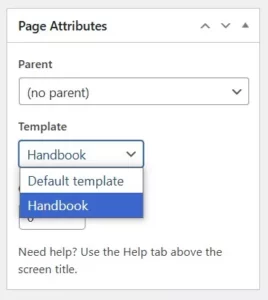
Then, navigate to the menus page (Appearance > Menus), and select the “Chapters” menu. Drag and drop your page where it needs to go.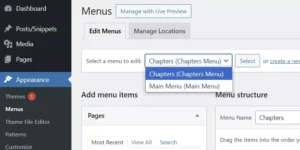 It will then show up in the left chapters sidebar.
Headings
Please note that all h2s will automatically be added to the right table of contents(“In this article”) pane. This will help with navigation. An anchor link will also automatically be attached to it to make sharing links to particular sections easier.
Screenshots
Unfortunately, there is no easy to copy and paste a screenshot in the WordPress editor, but if you need to add one, here’s how I typically do it:
- Take the screenshot and save it on your computer
- Select where you want the image to appear in the WYSIWYG editor. Note that it will show up under the text on the front end.
- Click Add Media above the WYSIWYG editor
- Upload and select your image
- Add it to the “Screenshots” category
- Click Insert into page